
ChatGPT Business Hub beta and what claiming a business changes
Suppose a customer asks ChatGPT about your shop or service and gets an outdated description. Where can you provide a correction? Businesses in ChatGPT, announced in beta by OpenAI on November 10, 2026, gives businesses a way to supply and review their information through Business Hub. But managing information is not the same as getting more recommendations.
Managing information is different from answering customers
A business owner or authorized representative can apply to claim a business in Business Hub. Claiming an eligible business does not require an advertising account or a ChatGPT Enterprise agreement. Despite the Business name, this is not the same process as signing up for an enterprise subscription.
That does not make every business in every country eligible. Both the business type and the available verification methods matter, as does whether ChatGPT is offered in the location. The official setup guide specifically says local stores and restaurants can currently claim only an existing US listing. Owners of shops in Korea should not assume the same process is available to them.
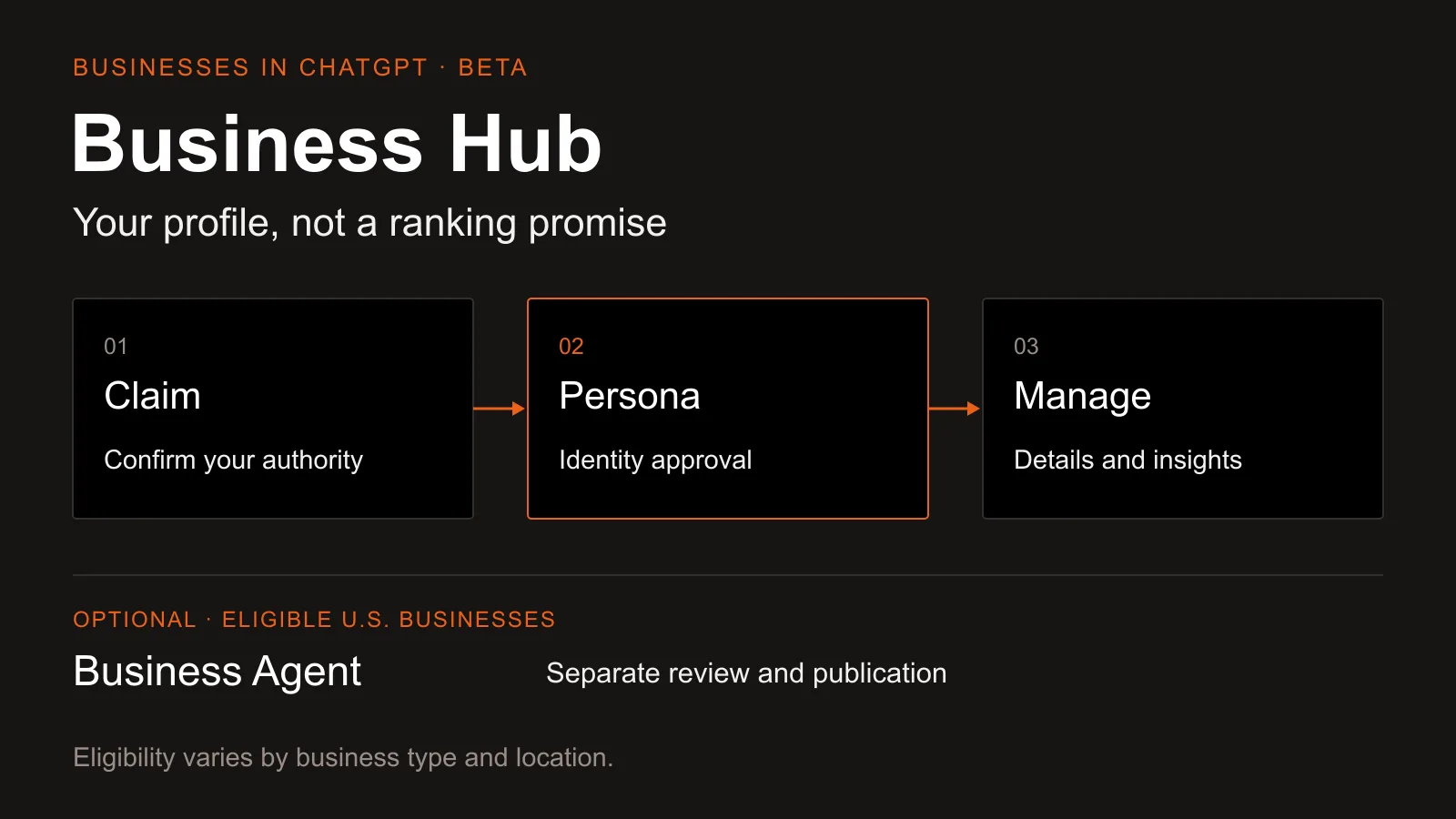
A Business Agent is a separate feature: a customer-facing AI conversation that uses the product and policy information a business supplies. It is currently available to eligible ecommerce and online service businesses in the US that have a website, with additional industry requirements. Being able to manage a profile does not necessarily make a business eligible for an agent.
Prepare public information before starting verification
Review the business name, website, description and policies you intend to make public before beginning verification. One detail matters in particular: when you use Persona to create a new profile, OpenAI approval publishes it automatically, without a separate profile-publishing step. The setup guide says only unpublished drafts can be deleted. It also says published profiles cannot be deleted, unpublished or hidden through a business setup or ownership request. Do not proceed on the assumption that you can simply hide the profile later.
Confirming business authority is not the final identity check
Start with Business Hub in the sidebar of ChatGPT on the web. Search for the business, select the matching listing and confirm which ChatGPT account will manage it. Follow one of the verification methods offered for that business, such as a business phone number, business email, website domain or Shopify. Domain verification involves adding a specified TXT verification record in the DNS settings that manage the website address. If someone else manages the domain, ask that person to add it.
Claim approval is not the end of verification. Approval through the identity-verification service Persona is required before you can publish information changes, connect a product feed or view insights. The blue verification badge appears after Persona approval, not simply after a claim. Submitting information and having it approved are different states.
A product feed supplies structured information such as product names, prices and availability. Connecting one does not publish an agent or guarantee product recommendations. Changes to business information also go through OpenAI review and publication, and can take time to appear in a listing or an answer. ChatGPT can continue to use sources other than the information the business provides.
Mentions are not rankings or sales
After claim and Persona approval, Insights shows aggregate activity over the past 28 days. For an online business, a mention counts when ChatGPT references the business website. Naming the brand alone does not count. For a local business, showing a result for that location counts as a mention. Those definitions are a reason not to treat the two types of count as directly equivalent.
A blank metric does not necessarily mean no activity
You can see website clicks and discovery topics, but not customers' individual prompts or conversations. Discovery topics group themes in answers that mentioned or cited the business; they are not the original customer questions. A blank metric does not necessarily mean zero activity. Reporting thresholds, ongoing collection or unavailable reporting can also explain it.
Likewise, do not read a click count as a purchase count. Use the tool to manage the information you supply and understand the scope of the available aggregates. OpenAI explicitly does not guarantee particular visibility, rankings, traffic or sales from claiming a business or using the tools. Claiming also does not give the business direct control over ChatGPT's independent recommendations.
Review and publish customer conversations separately
For an eligible business using a Business Agent, customer chats are separate from the original ChatGPT conversation and clearly labeled as representing the business. They are distinct from ChatGPT's independent answers. The current experience focuses on explaining products and policies and linking to the website. It cannot complete purchases or bookings, or look up a customer's order.
Before publication, use preview to check questions customers commonly ask. For example, ask whether a discounted item can be returned. If the answer differs from the actual policy, revise the information or instructions and check again. Customers can chat with the agent only after it has been reviewed and separately published. Managing a profile, publishing an agent and running ads are different choices.
Start by checking the location, business-type and verification requirements, then prepare the information that will become public on approval. You can manage information without choosing customer chats or advertising. A realistic starting point is to treat claiming as a way to maintain accurate business information, not as a purchase of a higher recommendation ranking.
- #AI
- #ChatGPT
- #Business Hub
- #Business profiles
- #AI search
More posts
Gemini 4 Hydrogen access is not the same as model selection
Free access to Gemini 4 Hydrogen has a condition. Learn how automatic selection differs from choosing a model, and what to check before using it for documents.
ChatGPT Wallet approval does not mean an order is confirmed
Who can use ChatGPT Wallet, how biometric approval works, and why approval is not an order confirmation. Check the merchant’s result before retrying a purchase.
Is SEO Over in the Age of AI? Comparing SEO, AEO, and GEO
Is SEO over now that people ask AI directly? Learn how SEO, AEO, and GEO differ, why they work together, how to apply them, and how to check your results.