
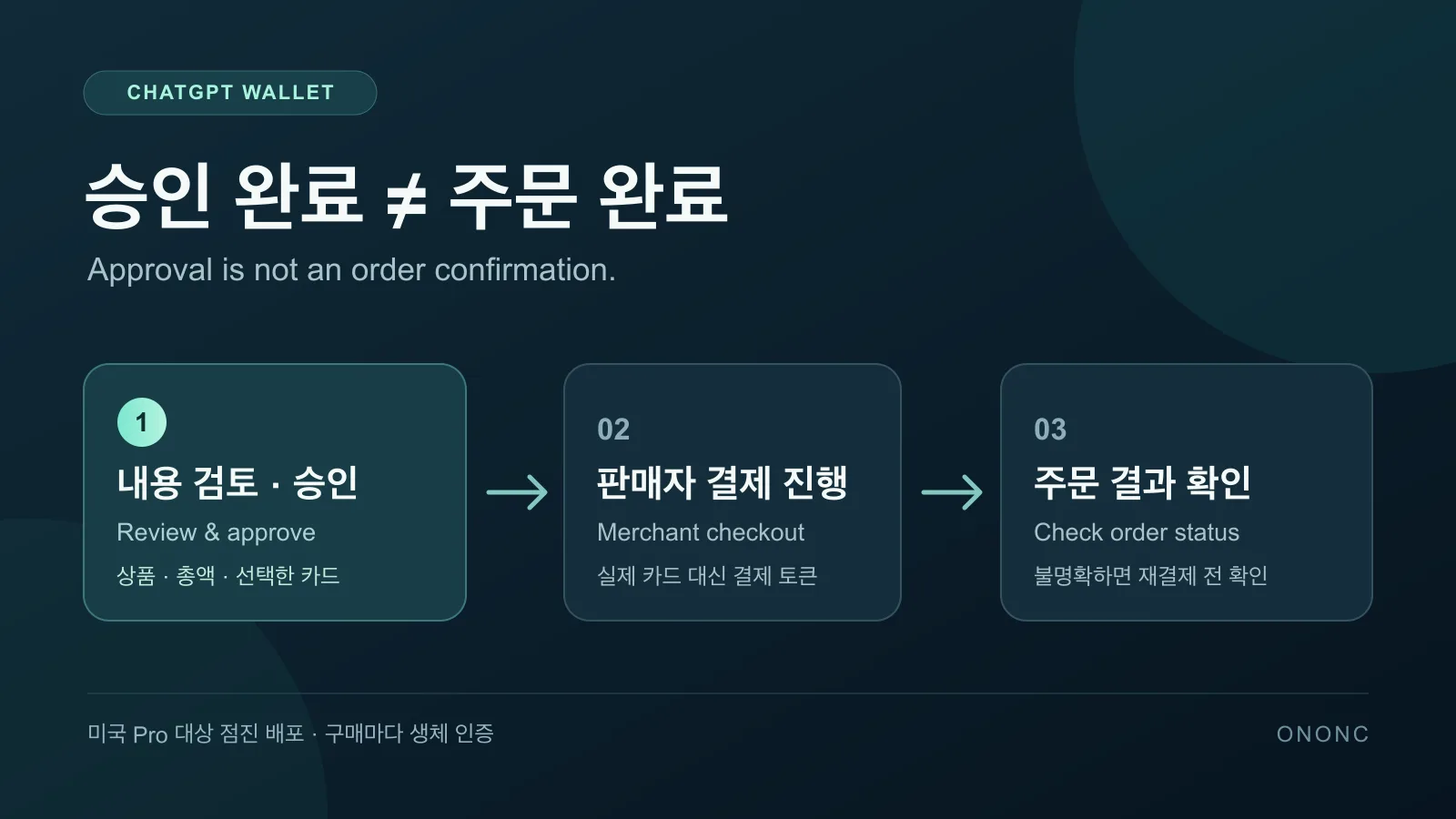
ChatGPT Wallet approval does not mean an order is confirmed
Asking AI to find a product is different from letting it complete a payment. ChatGPT Wallet, announced by OpenAI on November 13, takes a step into that final part of shopping. The useful question is not whether AI can now handle every purchase alone. It is how to distinguish what you approved from the order a merchant actually accepted.
The initial rollout is limited to eligible US Pro users
The initial audience is ChatGPT Pro users in the United States. The official help page requires users to be 18 or older, live in the US, have a US billing address, and use an eligible US-issued credit card. Debit cards are not supported, and virtual cards cannot be added at launch. This is not a broadly available payment option for users in Korea.
Wallet works in conversations with your dot in dots. A dot is an AI agent that helps carry out requested tasks. The current help page explicitly excludes Chat, Work and standalone Codex threads. Even an eligible US Pro account may not have access yet because availability is rolling out gradually. Start by checking whether the feature is actually available on your account.
Adding a card does not approve every future purchase
Wallet requires the user to review and approve each purchase. Check the merchant, items, total and selected card, along with any shipping or recurring-payment terms shown. Approval requires biometric verification, such as Face ID or a fingerprint scan, on a supported device. Saving a card does not mean you have delegated every later purchasing decision.
After approval, Wallet generates a payment token. It provides a substitute card number, security code and expiration date for checkout. OpenAI says the agent and merchant do not receive your actual card details. The virtual number used for an approved payment is separate from the question of which cards users are allowed to add to Wallet.
Enter card details in the secure form rather than chat
Card enrollment deserves its own review. Enter the card number, expiration date and security code in the secure card-setup form, not the conversation. Your bank may ask for additional verification. Approving card enrollment and approving a particular purchase are separate steps, so check what you are authorizing at each stage.
Check the merchant’s order result after approving
One especially important status in the official help page is Ready to check out. It means your approval is complete. It does not confirm that the merchant has placed your order. After approval, the agent still needs to continue the merchant’s checkout process and report the result.
For example, suppose the conversation stops responding or shows a checkout error after approval. Instead of immediately repeating the purchase, check the merchant’s confirmation, receipt or order history. If the result remains unclear, contact the merchant first. If a pending charge appears, your card issuer can help explain the hold. A conversation error by itself does not establish that no order exists.
Checkout is not guaranteed at every store, either. OpenAI explains that website access restrictions or payment and risk systems may block legitimate agent purchases. The Verge also discusses retailers that restrict AI agents. Having Wallet available is different from knowing that a particular merchant can complete the transaction.
Recurring payments and cancellations need separate attention
If you agree to a recurring or continuous payment plan, the merchant may store the payment credential and charge it again under the agreed terms. Removing a card from Wallet does not cancel an existing order or recurring charge. That is why reviewing the request includes checking for future payments, not just the amount due now.
It also helps to know who is handling the transaction. You transact directly with the merchant, which manages pricing, fulfillment, returns and customer service. OpenAI says existing card rewards and protections for eligible disputes are preserved. That should not be read as a guarantee that every checkout will succeed or that every purchase will receive an automatic refund.
- Ask the merchant about order status, cancellations, returns and refunds.
- Contact the card issuer about declined, pending, disputed or unrecognized charges and card-verification issues.
- Contact OpenAI Support about Wallet enrollment or approval-flow errors.
Delegating checkout does not remove the final confirmation
OpenAI also describes a future direction in which users could pre-approve agent purchases within defined spending limits, categories or time periods. That is a forward-looking plan, not the current per-purchase approval process. A future delegation model should not be mistaken for unattended purchasing that is already available.
A practical way to understand ChatGPT Wallet is to keep three checks separate. Confirm that you are eligible, review and approve the purchase request and its terms, then check the merchant’s order result. AI can help with the payment work, but approval and order confirmation are not the same check.
- #AI
- #ChatGPT
- #ChatGPT Wallet
- #AI agents
- #Payment approval
More posts
Gemini 4 Hydrogen access is not the same as model selection
Free access to Gemini 4 Hydrogen has a condition. Learn how automatic selection differs from choosing a model, and what to check before using it for documents.
ChatGPT Business Hub beta and what claiming a business changes
Understand Business Hub eligibility, Persona checks, automatic profile publication and why claiming a business does not guarantee recommendations or sales.
Is SEO Over in the Age of AI? Comparing SEO, AEO, and GEO
Is SEO over now that people ask AI directly? Learn how SEO, AEO, and GEO differ, why they work together, how to apply them, and how to check your results.