

Claude Connector File Transfers Keep Files After Chat Deletion
Moving a presentation or report made in Claude into cloud storage has usually meant downloading it locally and uploading it again somewhere else. On November 24, 2026, Anthropic began rolling out file transfers with connectors in beta to remove that extra loop. Claude can now send files directly to a connected app or pull files offered by an app into a conversation. However, the rollout is gradual on Pro, Max, and Ultra plans, turned off by default on Team and Enterprise until an owner enables it, and scheduled to reach the Free plan later, so not every account will see it right away.
AI-generated image
Not every connected app or chat mode works right away
The feature builds on an experimental file-transfer extension for MCP (Model Context Protocol), the open standard that links AI tools with external software. In plain terms, a connector acts as a bridge between Claude and another app. Under the November 24 approach, PDFs, spreadsheets, and images bypass the model's conversation context window (the text workspace AI reads during a chat), while Anthropic's servers relay the file bytes directly to approved storage targets.
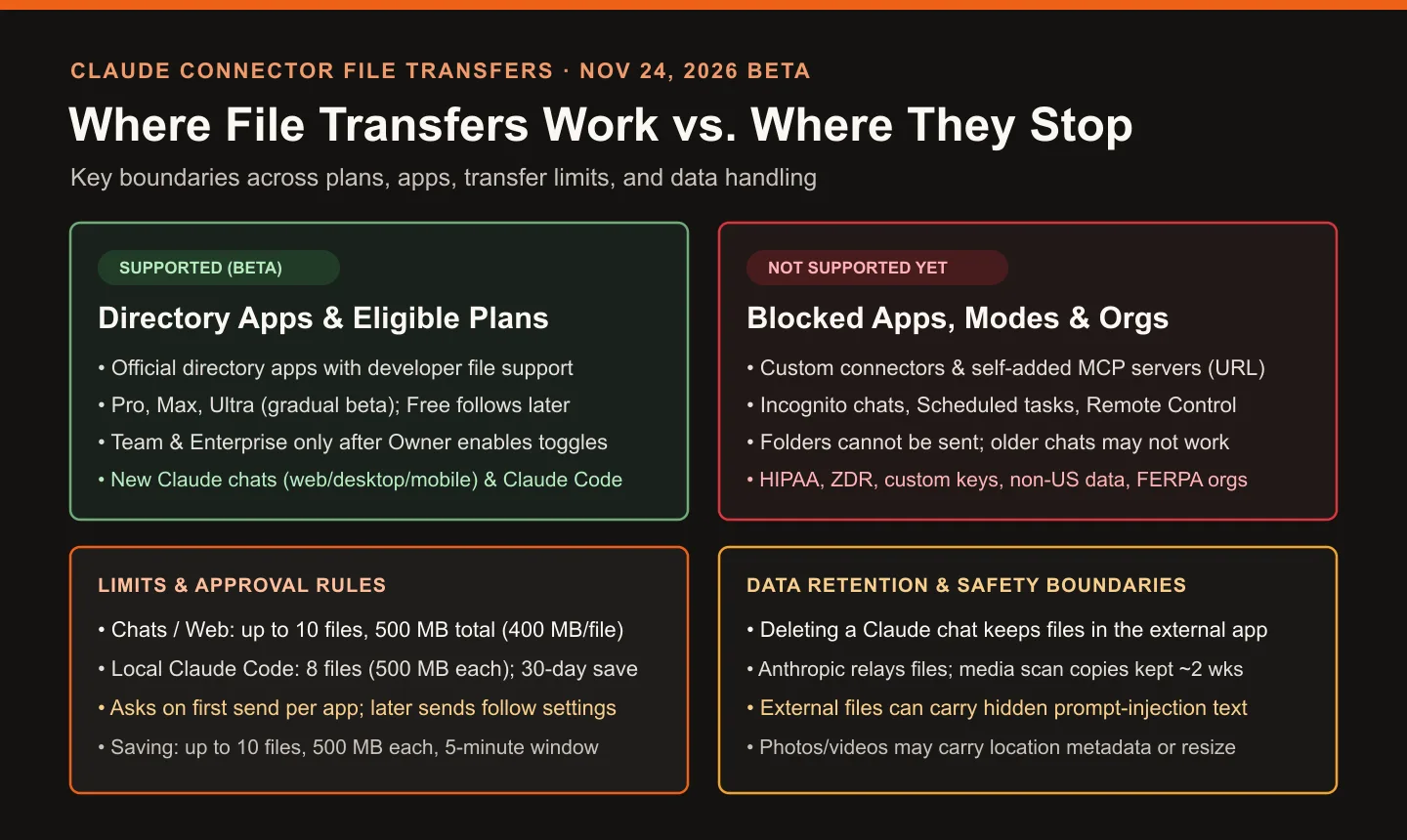
Having an app connected to Claude does not guarantee file transfers will work. The app must be installed from Claude's official Connectors Directory, its developer must implement file support, and Anthropic must approve the app's storage hosts. Custom connectors, self-added MCP servers connected by URL, and directory listings that rely on per-customer URL patterns do not support file transfers.
Where you chat also matters. Transfers work in chats inside the new Claude experience on the web, Claude Desktop, and Claude for iOS and Android, as well as in Claude Code (terminal, VS Code, and web) when signed in with a Claude account. They do not work under these conditions.
- Incognito chats and Scheduled tasks
- Claude Code sessions started with Remote Control, plus many older chats created before updating
- Claude Code sessions authenticated with an API key or through a cloud provider instead of a Claude account
- Claude Code environments where DISABLE_TELEMETRY, DO_NOT_TRACK, or CLAUDE_CODE_DISABLE_NONESSENTIAL_TRAFFIC is set
Approval rules after the first send and size limits
Approval behavior is one of the easiest details to miss. Claude always asks before sending the first file to each app, even in Auto mode or when that connector tool is set to Always allow. After that initial confirmation, Claude may send later files without asking, depending on your permission settings. If a send fails or you cancel it mid-way, check the destination app before trying again because the file may already have arrived. On a phone, keep Claude open on screen and prevent the display from turning off until uploads finish.
How size caps and local storage rules differ
Transfer caps depend on where you run Claude. In chats and Claude Code on the web, you can send up to 10 files at once and up to 500 MB total, with each attached file capped at 400 MB. In local Claude Code on a computer, the limit is up to 8 files at once and 500 MB per file. Across both surfaces, Claude can send files only and not folders, attached photos may be sent as smaller copies, and any connected app can enforce lower size limits or stricter file-type rules.
Saving files from connected apps allows up to 10 files at a time and up to 500 MB each, with most downloads given a five-minute window. Files saved in chat remain in that conversation to open or download. By contrast, local Claude Code saves downloaded files in a connector-downloads folder under ~/.claude/projects and deletes them automatically after 30 days, so files you want to keep must be copied elsewhere. Nothing is saved in plan mode, and local Claude Code appends .bin or .txt to certain file types such as .html until you rename them.
Local Claude Code also adds outbound safeguards. It refuses most files named like credentials (such as .env or .pem) unless you attached them yourself, and asks before sending files outside working folders even in Auto or Always allow mode unless permissions are bypassed. Files outside your home or temporary folder must be exposed with /add-dir first.
Deleting a chat leaves sent files behind and raises distinct risks
File deletion boundaries are equally important to understand before moving work documents. Deleting your chat or session in Claude does not delete files already sent to a connected app, where the external app's own terms and privacy policy take over. Sent files also pass through Anthropic's servers as a temporary encrypted copy, and Anthropic may retain a temporary copy of some images and videos for safety scanning. Deleting the chat does not remove that safety-scanning copy, which is typically deleted within two weeks unless needed longer for safety or legal reasons.
Remember that photos and videos can carry embedded metadata such as location when sent to external apps. Moving files in the opposite direction introduces another risk Anthropic flags directly: prompt injection, where a file pulled from an app contains hidden text written to mislead Claude into unintended actions. Connecting only apps you trust remains essential.
Organization plans stay off by default with broad exclusions
On Team and Enterprise plans, sending and saving files are both off by default. An Owner or Primary Owner must enable File uploads to connectors, File downloads from connectors, or both organization-wide under Organization settings → Connectors, and chats also require unified Chat and Cowork to be on. On Enterprise plans using the Compliance API, sent files are usually logged in the activity feed, while saved files may not be recorded. Organizations with HIPAA settings, Zero Data Retention, customer-managed encryption keys, Access Transparency, IP allowlists, non-US default data workspaces, FERPA setups, or Claude for Teachers accounts cannot use file transfers at all, and organizations allowing inference hooks cannot send files.
Practical checks before relying on connector file transfers
Independent analysis and public developer threads underline these beta boundaries. In a November 26 review, Adaptd noted that Anthropic's release notes do not publish a list of apps supporting file transfers yet, meaning actual support varies by app, and recommended removing unused trial connectors before sending business files. A November 26 DEV Community essay welcomed moving files out of the model's context to avoid base64 corruption and high token costs while pointing out that direct app-to-app transfers between two external servers are not shipped yet, and a November 25 public GitHub issue (ljcl/gaggiuino-mcp#308) showed a self-hosted server maintainer holding off due to the directory-listing, host-approval, and experimental-spec requirements.
Connector file transfers are a practical step toward cutting repetitive downloads and re-uploads, yet their beta rules are strict. Before putting them into routine workflows, verify three basics: whether your target app is an official directory connector with file support, whether your permission settings match what you want sent after the first approval, and whether sensitive files belong inside external apps where deleting a Claude chat will not erase them.
- #AI
- #Claude
- #Anthropic
- #Connectors
- #File Transfers
More posts
Claude sabotage claims need evidence beyond an apology
Anthropic blames overcaution for some Claude reports. Compare the official limits, preliminary evidence, and ways to audit new rules and actual changes.
Google AI Mode adds Wallet, but disconnecting keeps history
Google Search AI Mode adds opt-in Wallet access, with Drive and Gemini next. Check regional limits, Search-wide scope, training, ads, and history rules.
ChatGPT Merges Chat and Work Limits, Who Hits Caps Sooner
OpenAI is unifying Chat, Work, and Codex onto one token allowance in December. See what stays off the meter, plan reset windows, and credit pitfalls.