

Google AI Mode adds Wallet, but disconnecting keeps history
Checking card rewards or year-end spending without retyping every detail into a search box sounds convenient. That is the pitch behind Google's November 23, 2026 expansion of Personal Intelligence (opt-in app linking) in Google Search AI Mode (Google's conversational AI search view). Still, read-only access in Google Wallet (meaning AI cannot move your money) is separate from how summaries of your personal context can enter model training, ads, and saved search history.
AI-generated image
Wallet starts rolling out while Drive and Gemini follow later
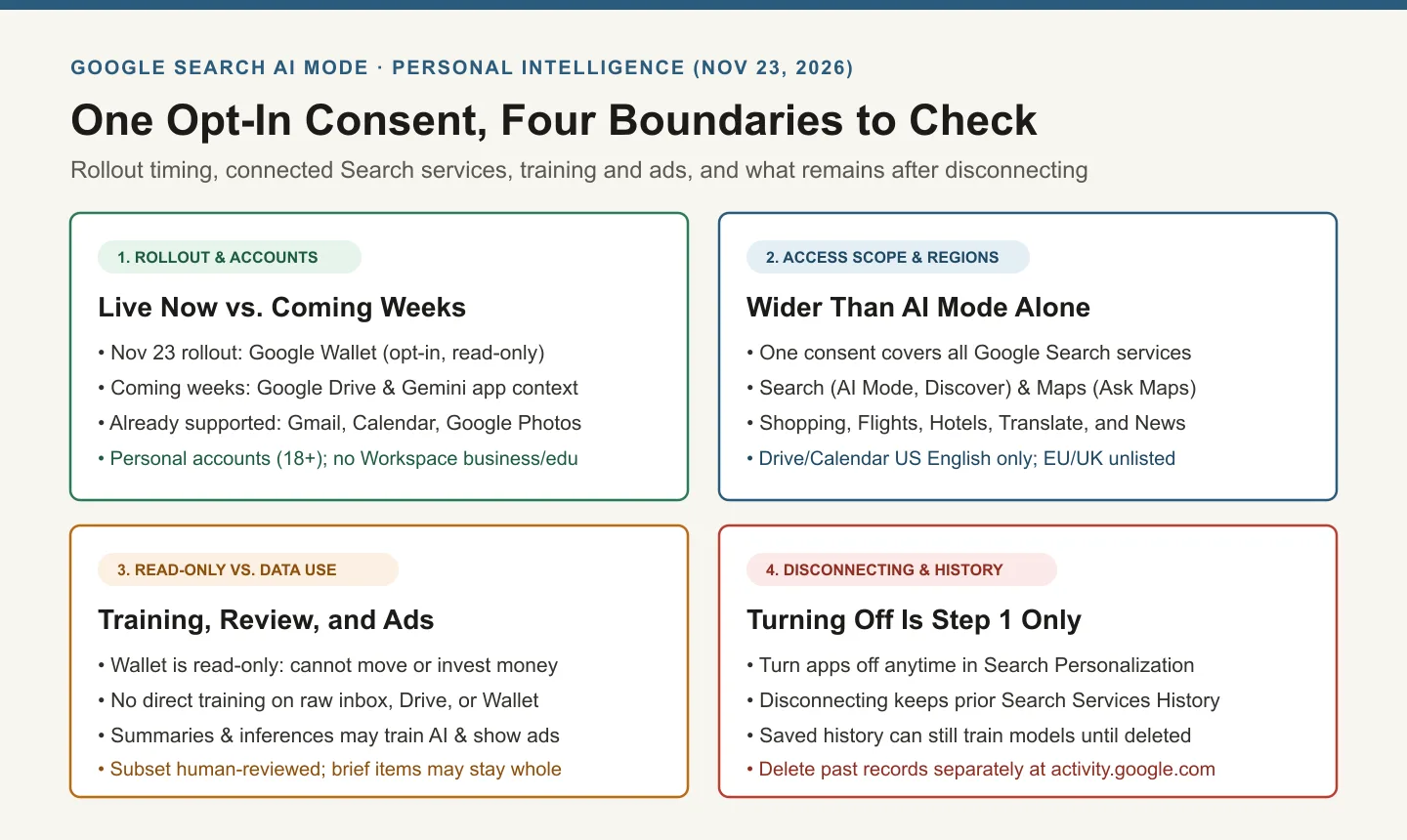
Headlines can make it sound as if Wallet, Drive, and the Gemini app all went live at once. Google's announcement draws a clear line on timing. Opt-in Google Wallet linking began rolling out on November 23, while Google Drive and Gemini app connections are scheduled to follow in the coming weeks. They build on existing Personal Intelligence connections for Gmail, Google Calendar, and Google Photos.
With Wallet connected, AI Mode can help track financial goals, spot ways to trim everyday spending, and suggest how to maximize cash-back categories, travel perks, and reward points on linked cards. Google states AI Mode can only read account information and cannot move, manage, or invest money. Once Drive arrives, AI Mode can draw across scattered Docs, Sheets, and PDFs for tasks like a tax-season prep plan. Once Gemini app linking arrives, context (including Gemini chats, shared photos, files, audio or video attachments, and screens you asked about) will carry across both surfaces, complementing the earlier Search-history link into Gemini.
Separately from connected apps, Google also started rolling out more personally relevant responses in AI Overviews (AI summaries at the top of search results) and AI Mode based on recent search context, such as continuing trip research in a new thread without repeating yourself. Soon, a Personalization icon below tailored answers will let you inspect which personal context AI Mode used and update details directly in the thread, such as telling it you are no longer a vegetarian.
Regional limits mean not every app works everywhere yet
Personal Intelligence connected apps require a personal Google Account for users age 18 or older with Personalized Recommendations enabled. Google Workspace business, enterprise, and education accounts are not eligible. Even though South Korea and Korean appear in Google Search Help's general supported list for connecting content apps, individual app availability varies sharply by region.
- Connecting Google Calendar and Google Drive is currently limited to the U.S. in English.
- Connecting Google Photos and Google Wallet is not available in all regions and is rolling out gradually.
- Linking bank or credit card accounts to Google Wallet through the third-party banking service Plaid is U.S.-only.
- European Union member states and the United Kingdom are absent from the supported country table.
One opt-in toggle reaches every Google Search service
While the announcement focuses on AI Mode, the underlying permission reaches much farther. According to Google's Search Help documentation, consenting to connect your content apps permits all Google Search services, not AI Mode alone, to access them. Google defines Search services to include Google Search (AI Mode and Discover), Maps (including Ask Maps), Shopping, Flights, Hotels, Translate, and News.
Read-only access still allows summaries in training, review, and ads
Public threads on MacRumors Forums and gHacks show everyday skepticism, with some readers joking about AI spending their credit cards and others welcoming the opt-in default. AI Mode cannot execute payments, yet the second concern users raised around training, human review, and ad targeting requires reading the fine print.
Look closely at the difference between raw data and summaries
Google says Search services do not train generative AI models directly on your raw Gmail inbox, Drive files, Calendar, or Google Wallet and payments data. However, summaries, excerpts, generated media, and inferences created when answering your prompts are used to train generative AI models. Google explicitly notes that when an email, file, or chat is brief or particularly relevant to a query, that summary may effectively be the email, file, or chat itself.
A subset of connected-app data processed by Search (covering interactions, summaries, excerpts, and inferences from emails, files, Wallet payment info, and upcoming Gemini app data) is also reviewed by human reviewers, including trained service providers. Google directly advises not connecting content apps if they hold personal or confidential material you would not want trained on or seen by a reviewer.
Advertising follows a similar line. Google states ads are not based directly on Gmail inboxes, Google Photos libraries, or Gemini chats and advertisers do not gain direct access to them. At the same time, summaries, excerpts, and inferences from connected content apps may be used to show ads, which can be personalized depending on your settings, while excluding sensitive categories like health or religion. Notably, that Help Center ad section specifically names Gmail, Photos, and Gemini chats without separately spelling out Wallet or Drive.
What to check before connecting and after turning an app off
All connected apps are off unless you opt in, and you can toggle individual apps off anytime under Search Personalization in Connected Apps. The catch many users miss is what happens afterward. Disconnecting a connected app or deleting files inside that app does not delete prior Search Services History, and saved history can still be used to train generative AI models unless removed separately.
Before opting in, check Search Personalization to see which apps are linked and hold off on connecting accounts filled with confidential work documents or financial records you want kept away from model training and human review. If you try a connection and later switch it off, follow up in Google Activity (activity.google.com) to review and delete saved Search Services History so the cleanup is actually complete.
- #AI
- #AI Mode
- #Google Wallet
- #Privacy
More posts
Claude sabotage claims need evidence beyond an apology
Anthropic blames overcaution for some Claude reports. Compare the official limits, preliminary evidence, and ways to audit new rules and actual changes.
Claude Connector File Transfers Keep Files After Chat Deletion
Explore Claude's Nov 24 beta for sending and saving files with connected apps, covering eligible plans, directory rules, size limits, retention, and safety.
ChatGPT Merges Chat and Work Limits, Who Hits Caps Sooner
OpenAI is unifying Chat, Work, and Codex onto one token allowance in December. See what stays off the meter, plan reset windows, and credit pitfalls.