

ChatGPT Merges Chat and Work Limits, Who Hits Caps Sooner
If you pay for ChatGPT to research topics, draft documents, or handle multi-step work, a notable quota change arrives in December. On November 24, 2026 (US time), OpenAI began rolling out a combined Chat and Work experience to a small group of Pro subscribers for early feedback, and its Help Center updated November 25 confirms that starting in December, Plus, Pro, and Business plans will share one usage allowance across ChatGPT and Codex. Bringing conversational chat and task-executing Work tools into one workspace also places them on a single meter.
AI-generated image
How the Single Token Meter Measures Your Usage
Across the unified ChatGPT experience and the Codex coding tool, usage is measured in tokens, which are small pieces of text or data that an AI model reads and generates. Your prompt is only part of the count: attached files, earlier chat history, outputs from connected tools, and ChatGPT's full reply all use tokens. Because model choice, context length, reasoning depth, tool calls, retrieval, and caching all change token consumption, two prompts that look similar in length can drain very different portions of your allowance.
OpenAI's support page states that most subscribers should not have to wait for usage resets more often than they do today. At the same time, an OpenAI spokesperson confirmed to TechCrunch on November 25 that a small fraction of the heaviest users may hit their limits sooner under the single meter. People who mostly ask quick questions may barely notice the transition, while subscribers who run long document analyses or multi-step agent tasks every day face tighter trade-offs.
Why Instant Chat Stays Off the Shared Meter
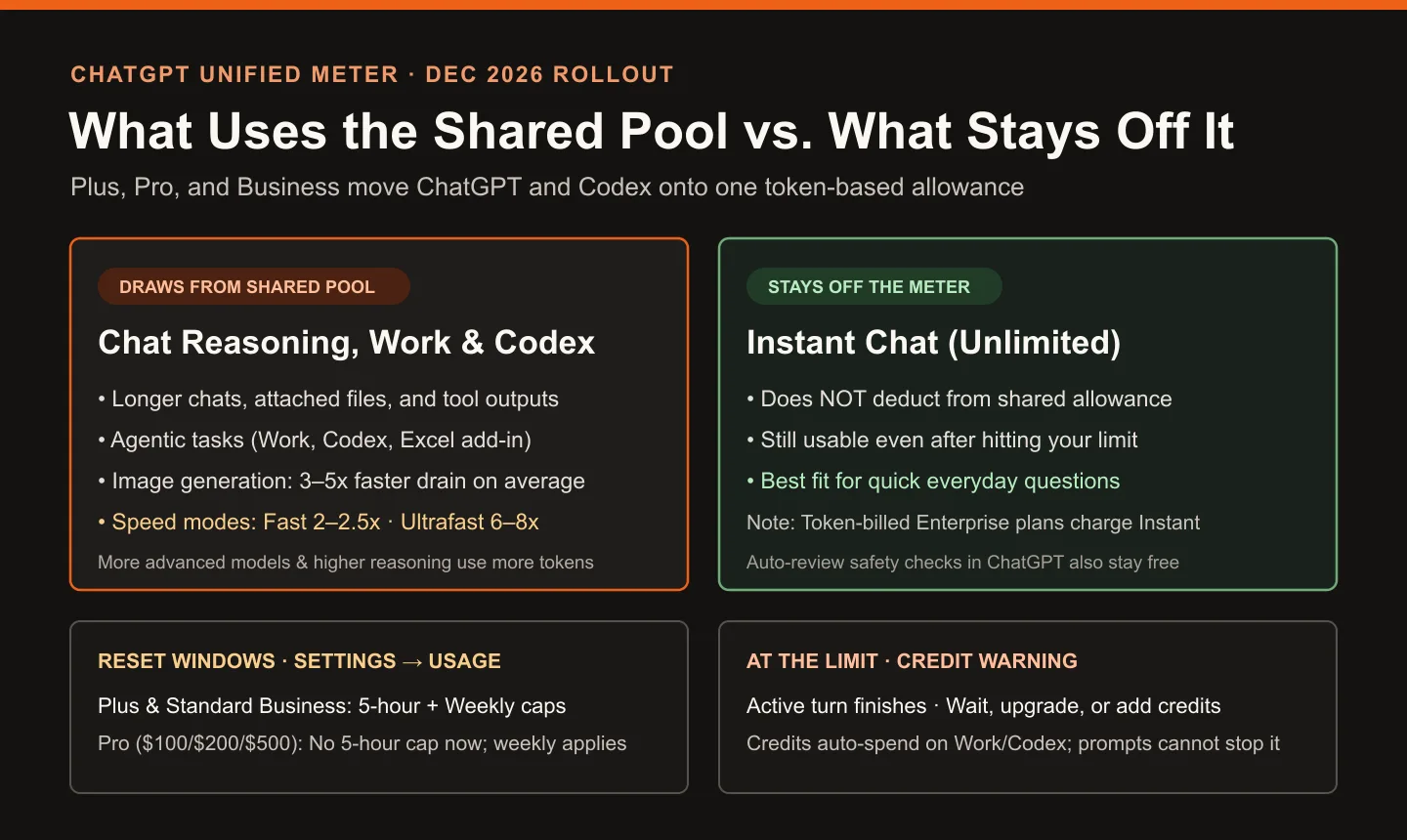
The main buffer for everyday subscribers is Instant chat. On Plus, Pro, and Business plans, Instant conversations do not draw from the shared allowance and remain unlimited. As OpenAI confirmed to TechCrunch, users can keep relying on Instant even after exhausting their shared usage cap. One exception applies to workplace contracts: on eligible token-based Enterprise agreements, Instant usage is billable at applicable model token rates, so managed enterprise users should check their organization's billing terms.
Plan Reset Windows and Features That Drain Caps Faster
Merging the meter does not erase differences between subscription tiers. Plus ($20/month) and Standard Business ($20 per user/month billed annually for two or more seats, or $25 monthly) enforce both a five-hour window and weekly limits, meaning you can hit the five-hour cap even when weekly capacity remains. By contrast, Pro plans ($100, $200, or $500/month) currently have no five-hour limit, though weekly limits may still apply.
OpenAI's official pricing guide illustrates how steeply model selection affects capacity on Plus and Standard Business. Estimated five-hour local message ranges span 350 to 3,000 for GPT-6 Luna, 35 to 285 for GPT-6.1 Terra, 17 to 180 for GPT-6.2 Sol, and 6 to 50 for the flagship GPT-6.2 Astra. OpenAI emphasizes that these are illustrative ranges rather than fixed guarantees, and cloud tasks can draw down your allowance faster than local messages.
How Image Generation, Speed Modes, and Office Add-ins Count
Beyond model choice, media creation and speed toggles accelerate meter burn. Image generation uses included allowance 3 to 5 times faster on average than comparable turns without images. Relative to Standard speed, Fast mode draws included allowance at 2x for GPT-6.2 Astra and Sol, or 2.5x for GPT-6.1 Sol/Terra and GPT-6 Astra/Sol/Luna. Ultrafast (included on Pro $500, and available for GPT-6.2 Sol in Codex on Pro $200) consumes included allowance at 6x on GPT-6.2 models and 8x on GPT-6 Astra and GPT-6.1 Sol. OpenAI explicitly notes that these multipliers are allowance consumption rates, not guarantees of faster replies.
Agentic add-ons also share the same pool once their pricing takes effect, which currently includes ChatGPT for Excel on Plus and Pro alongside Word and PowerPoint credit support. On the other hand, auto-review safety checks run while signed in with a ChatGPT account remain free and do not count against plan limits.
What Happens at the Limit and Why Credits Need Caution
You can track your combined remaining balance and reset schedule inside Settings → Usage. If you hit your cap mid-turn, OpenAI allows the active turn to finish subject to fair use limits. Once stopped, your three official options are waiting for the next reset, upgrading your subscription tier, or buying credits to keep running eligible features including Codex, ChatGPT Work, Word, Excel, and PowerPoint.
Before buying credits ahead of time, note several strict rules in OpenAI's personal credits guide. Included plan usage is always consumed first, and credits neither cover every ChatGPT model or feature nor unlock gated tiers like Ultrafast. Usage credits are separate from ChatGPT Wallet dollar balances and expire 12 months from purchase (180 days for credits bought in Japan after November 13, 2026). Most importantly, saving a custom instruction asking ChatGPT to check before using credits does not create a billing approval step: if you keep running Work or Codex after hitting your plan limit, available credits can be spent automatically, and OpenAI Support cannot manually reset usage limits.
Practical Habits to Check Before December Arrives
The shift mirrors a broader industry trend after Anthropic combined Claude chat and Cowork under one interface in September 2026. Still, individual Plus and Business subscribers posting in November on public GitHub issue #58742 and on November 24 and 25 in OpenAI's Developer Community drew a clear line between merging tabs and merging quotas, noting that unlimited Instant cannot replace Medium or High reasoning for research and complex work, and pointing out that OpenAI has not published exact total token quotas per tier.
- Route quick lookups, light edits, and routine checks to Instant chat so they stay off your shared allowance.
- Upload only the specific files or date ranges relevant to a task instead of attaching bulky folders full of extra context.
- Specify audience, format, and length upfront so you avoid lengthy rewrites and oversized responses.
- Turn off unused MCP servers (external tool connectors), since each active server adds extra context to your messages.
- Check Settings → Usage over a normal week to understand your pace before enabling automatic credit reloads.
Overall, December's unified meter matters less for casual everyday chats and much more for paid subscribers who pair heavy reasoning sessions with large files and agentic workflows. Checking your weekly pace in Settings → Usage and trimming unnecessary context or connectors now is the cleanest way to avoid surprise pauses or unintended credit spending once the rollout reaches your account.
- #AI
- #ChatGPT
- #OpenAI
- #Usage Limits
- #Pricing
More posts
Claude Artifacts as Desktop Apps Still Need Online Sign-In
Claude's Nov 24 Install as app beta turns artifacts into Mac and Windows apps. See online sign-in rules, three permission tiers, update prompts, and limits.
GPT-6.2 Reaches ChatGPT Chat, With Key Plan and Picker Limits
GPT-6.2 is rolling out to paid ChatGPT Chat tabs. Learn who gets access, why selecting it hides 6 Pro, and the trade-offs noted in OpenAI's system card.
Claude computer use beta goes beyond read-only folders
Understand Claude's Team and Enterprise beta: organization controls, individual app approval, mobile connections, and the limits of read-only folders.