
GPT-6.2 Reaches ChatGPT Chat, With Key Plan and Picker Limits
After launching last week only as a preview in ChatGPT Work and Codex, GPT-6.2 is now arriving in the regular ChatGPT Chat tab. Starting November 23, 2026, OpenAI began a global rollout of a chat-tuned version of GPT-6.2 for paid subscribers.
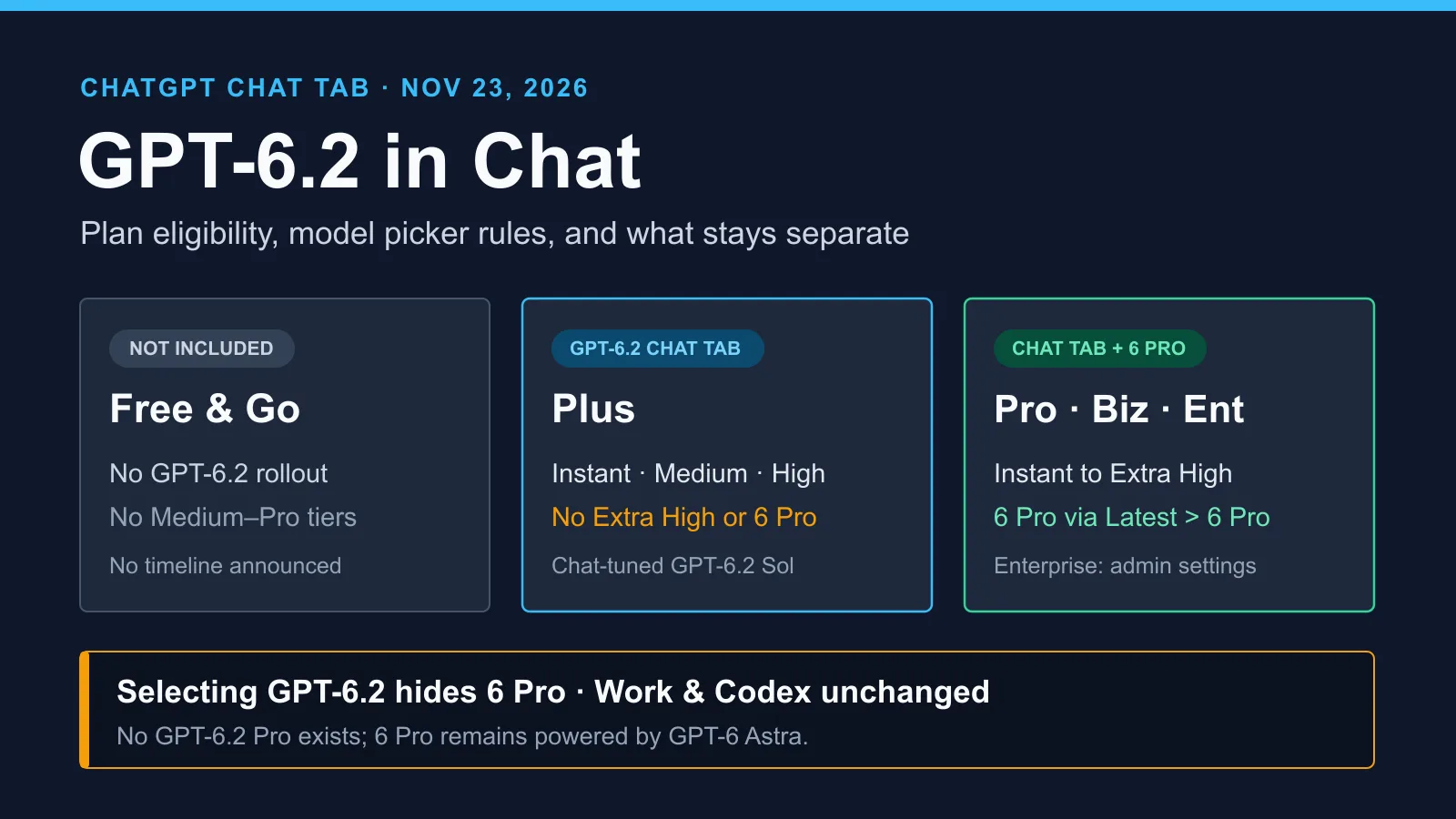
Seeing a newer model name does not mean every account or mode updates the same way. Free and Go plans are excluded from this rollout, and paid users who pick GPT-6.2 directly in the model menu will notice that 6 Pro disappears unless they use a different path.
Who gets GPT-6.2 in regular Chat and where it stops
The Chat-tab update is powered by a version of GPT-6.2 Sol tuned for everyday conversation. It is rolling out globally to Plus, Pro, Business, and Enterprise plans, though Enterprise access depends on workplace administrator settings. Free and Go tiers are not part of this release, and OpenAI has not announced a timeline for them.
Product boundaries also remain separate. This update applies only to the regular Chat experience and does not change the models powering ChatGPT Work or Codex. In other words, GPT-6.2 Astra from Work has not moved into the standard Chat tab.
Thinking levels (the settings that control how long ChatGPT reasons before replying) also vary by plan. Where GPT-6.2 appears in the picker, selecting Latest uses GPT-6.2 for Instant, Medium, High, and Extra High within what your plan allows.
- Plus plans Include Instant, Medium, and High, but do not include Extra High or Pro.
- Pro, Business, and Enterprise plans Include Instant through Extra High, plus separate Pro access where eligible and permitted by workspace settings.
- Free and Go plans Do not include Medium through Pro thinking levels or this GPT-6.2 Chat-tab rollout.
Why selecting GPT-6.2 hides the 6 Pro option
This is the easiest detail for Pro, Business, and Enterprise subscribers to miss. There is no GPT-6.2 Pro option in Chat; the Pro reasoning tier still runs on GPT-6 Pro, powered by GPT-6 Astra.
When GPT-6.2 is selected directly in the Chat picker, 6 Pro does not appear at all. To use GPT-6 Pro, eligible subscribers need to open the model picker and choose 6 Pro under Latest, or pick Pro under GPT-6 if their account still displays the older picker.
What changed in everyday chat and what the numbers mean
OpenAI says the chat-tuned GPT-6.2 handles multi-part requests and web lookups more effectively. For instance, it can weigh priorities such as price and location when comparing weekend hotels, and better judge when to suggest a follow-up, such as offering to notify you if an item drops in price.
Closer reading of photos and multi-part requests
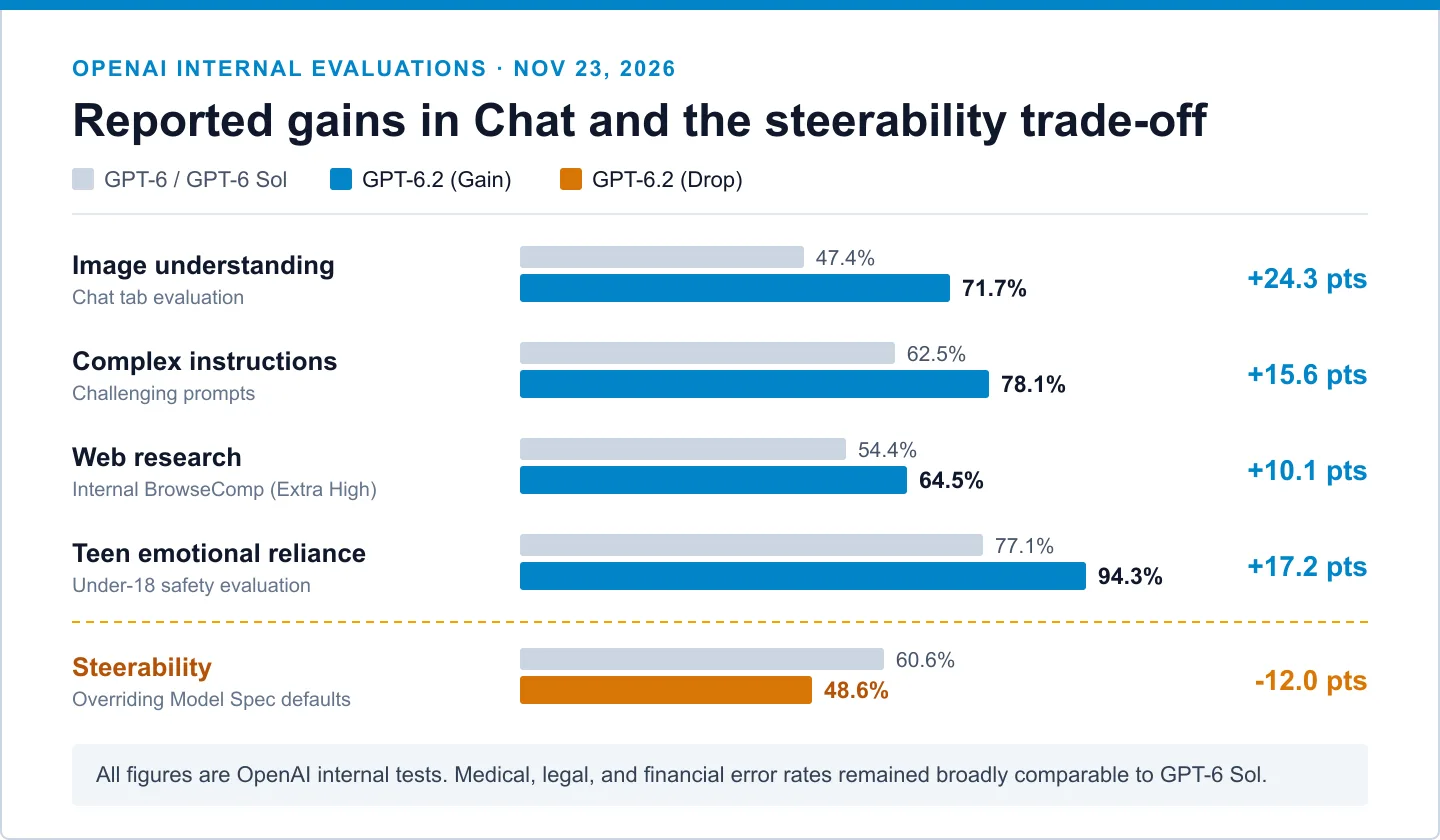
The sharpest reported jump is in visual understanding and strict instruction following. In OpenAI's internal Chat-tab tests, image understanding rose from 47.4% for GPT-6 to 71.7%, while following complex instructions on challenging prompts climbed from 62.5% to 78.1%.
At the lowest tested reasoning level, OpenAI's internal score on expert-level tasks moved from 52% to 65%. On an internal version of BrowseComp for tough web searches, GPT-6.2 beat GPT-6 across all four reasoning levels, reaching 64.5% versus 54.4% at Extra High. Keep in mind that all of these percentages come from OpenAI's own internal evaluations, not independent external audits, so real-world gains will still vary by prompt and image quality.
A more cautious tone and the limits in OpenAI's system card
OpenAI's November 23 system card points to stronger safety boundaries across sensitive topics. Policy compliance in challenging conversations rose from 77 to 80% for GPT-6 to 91 to 94%, and all six under-18 safety categories improved, led by emotional reliance (77.1% to 94.3%), eating disorders (77.2% to 92.9%), and age-restricted goods, services, and dangerous activities (80.0% to 90.8%).
The model also became more transparent about uncertainty. Its Conversation Replay score rose from 73.5 to 75.5 over GPT-6 Sol, with roughly two-thirds of the net gain coming from expressing uncertainty, such as keeping spreadsheet formula errors visible instead of silently outputting zero, or listing confirmed car repairs as approved rather than assuming they were already completed.
At the same time, the system card documents a clear trade-off. Steerability (how reliably the model overrides OpenAI's default Model Spec guidelines when explicitly asked) dropped from 60.6% for GPT-6 Sol to 48.6% for GPT-6.2. When asked to argue only one side of a debate, it more often included the opposing view, and when given a false premise, it corrected it instead of playing along. OpenAI also noted a slight increase in unnecessary refusals on sensitive but legitimate prompts.
Early posts on OpenAI's public Developer Community on November 23 and 24 echoed that contrast. Individual paid users noted that GPT-6.2 read uploaded images reliably while feeling cooler and more cautious in casual chat or creative editing than GPT-6, leading some to switch back to GPT-6 in the picker. Those threads reflect individual impressions rather than broad statistics. OpenAI's Help Center notes that this rollout itself does not retire older selectable models, though exact menu options depend on your plan and account rollout.
Practical checks before relying on the updated Chat tab
A higher version number does not eliminate the need to check critical facts. In OpenAI's factuality evaluations, GPT-6.2 cut errors significantly on previously User Flagged Failures, yet its error rates on Factuality-Heavy and High-Stakes prompts covering medical, legal, and financial topics remained broadly comparable to GPT-6 Sol. Any consequential decision still calls for primary sources or qualified human advice.
If stronger image reading leads you to upload more screenshots, receipts, or schedules, make a habit of cropping out account numbers, home addresses, and private notifications first. Using GPT-6.2 for photo analysis and detailed multi-step requests, while checking the picker whenever you need 6 Pro or an earlier conversational style, is the clearest way to get value from the update without surprises.
- #AI
- #ChatGPT
- #GPT-6.2
- #OpenAI
- #AI Productivity
More posts
ChatGPT Merges Chat and Work Limits, Who Hits Caps Sooner
OpenAI is unifying Chat, Work, and Codex onto one token allowance in December. See what stays off the meter, plan reset windows, and credit pitfalls.
Claude Artifacts as Desktop Apps Still Need Online Sign-In
Claude's Nov 24 Install as app beta turns artifacts into Mac and Windows apps. See online sign-in rules, three permission tiers, update prompts, and limits.
Claude computer use beta goes beyond read-only folders
Understand Claude's Team and Enterprise beta: organization controls, individual app approval, mobile connections, and the limits of read-only folders.