
Claude computer use beta goes beyond read-only folders
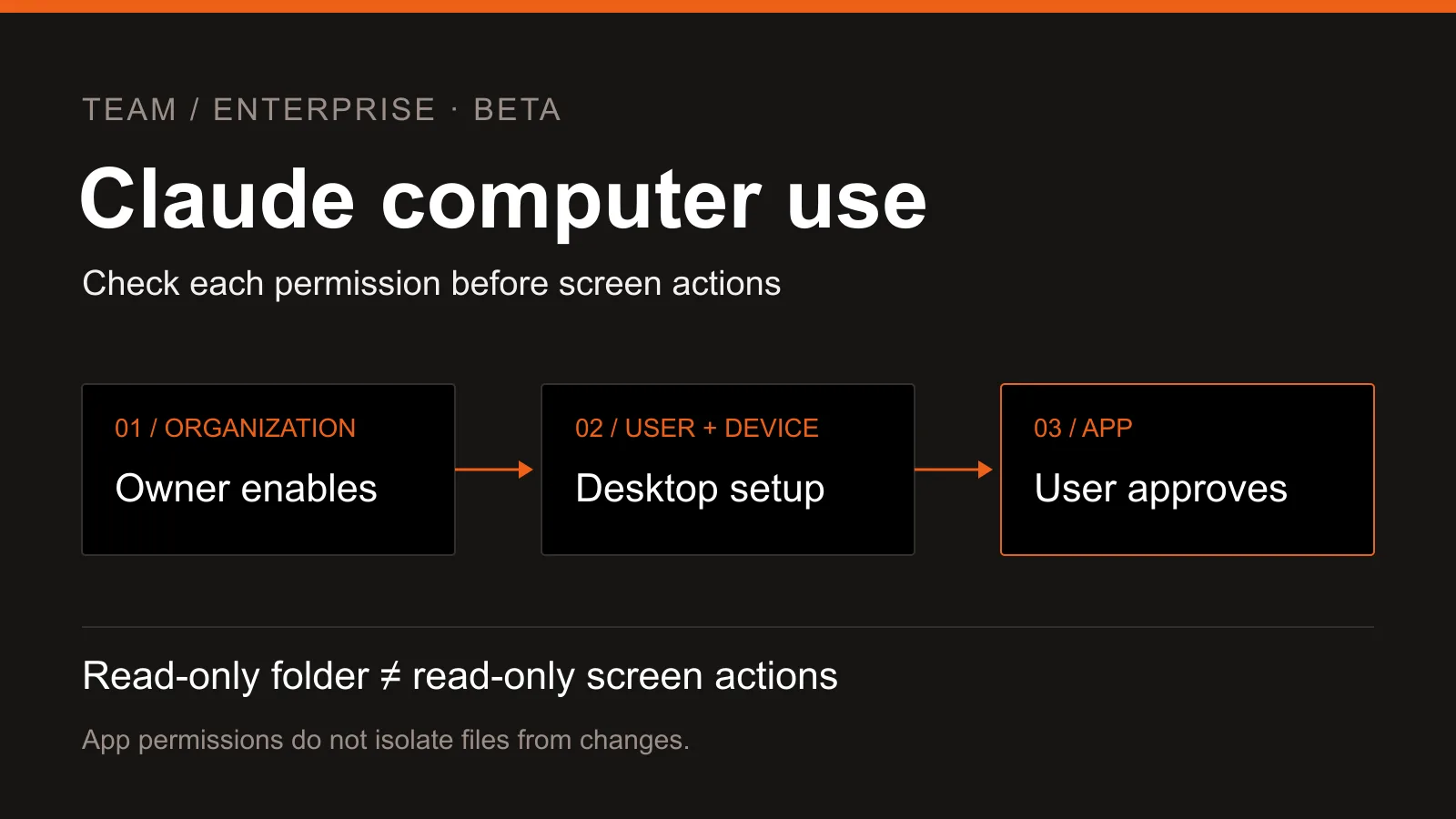
If you put company documents in a read-only folder and ask Claude to organize them, are the files protected? Reading a document is different from seeing a screen and operating an app. In this computer use beta, read-only folder settings do not prevent screen-based actions.
The Team and Enterprise expansion covers screen actions
On November 20, Anthropic announced computer use in beta for Claude Team and Enterprise plans. It lets Claude see the screen and click and type in desktop apps the user allows. The rollout is gradual across organizations, so a paid organization account does not mean the feature appears immediately.
As an example, you might ask Claude to organize work material open in an app. Do not treat this as a tool that only reads connected folders. Through approved apps, it can also open, change, or delete files outside those folders. Connected-folder limits and read-only settings do not apply to this way of operating the computer.
Organization permission and app approval are separate
Computer use is off by default for Team and Enterprise. An Owner or Primary Owner must open Organization settings, go to Capabilities, enable Chat and Cowork unified, and turn on Computer use under Claude Desktop. The first setting enables the new experience combining chat and work. A missing or unavailable switch can mean the rollout has not reached the organization or its configuration is excluded.
On Team, the organization-wide computer use setting covers every member. Enterprise can restrict access using custom roles, which are separately defined sets of permissions. If the intention is to allow only a small group, agree on that group with the administrator rather than assuming everyone can simply enable it individually.
The device and account need their own setup
Organization permission does not finish individual setup. The latest Claude Desktop must be open on the computer being used. It supports macOS 14 or later and Windows. Each person must enable Enable computer use on each computer and for each account. On Mac, Accessibility and Screen Recording permissions are also required.
Putting an app on the organization's allow list does not replace individual app approval. An allow list restricts apps outside the list; a block list restricts the named apps. In either case, organization permission alone does not let Claude immediately operate every app.
Starting on a phone still needs a connected computer
Computer use and Computer access sound similar but are different. The former operates screens and apps. The latter is a separate setting for reaching a computer from web, mobile, or scheduled tasks. Computer use from the web or Claude Mobile needs the organization's Computer access setting enabled and the chat connected to the relevant computer with Claude Desktop open.
The older work mode does not behave the same way
This Team and Enterprise beta works only in the new unified Claude experience. It does not work in tasks started with the separate Cowork option or in Claude Code. Do not apply instructions for personal plans directly to an organization account.
The official documentation also lists excluded organization configurations: HIPAA-ready for protected health information, Zero Data Retention or ZDR for Claude Code, customer-managed encryption keys or CMEK, and FERPA or K-12 settings for education. This setup document does not list availability by country. Rather than assuming every organization, including those in Korea, can use it immediately, check the feature and exclusions in the actual account.
App permission is not a file-protection barrier
The official documentation says there is no sandbox, a separate isolation boundary, between computer use and the user's apps. Content visible in a web page or email can cause unintended actions. Screenshots taken during the task are saved with the chat and can contain personal or confidential information. The automated action check can also see the latest screenshot, and Anthropic can keep a copy in its record of that check.
An app block list does not cover every route. Other Claude tools, other accounts, websites and extensions inside an approved browser, apps inside a remote desktop, and indirect effects through approved apps fall outside its limits. Text copied from a denied app and information visible in Windows notifications need separate attention too.
For an initial trial, close sensitive documents and screens and keep the task small, using example material that is safe to expose. Do not delegate changes to original files or external sending before review; decide how a person will check the result. Turning off the organization setting can take about an hour, sometimes longer, to reach each Claude Desktop, so do not rely on that setting alone as an immediate stop.
The key question is not only what Claude can read, but which apps and screens it can operate. A read-only folder is not enough reassurance. Define the account, allowed apps, information left on screen, and results a person must verify together.
- #AI
- #Claude
- #Computer use
- #Workplace security
More posts
ChatGPT Merges Chat and Work Limits, Who Hits Caps Sooner
OpenAI is unifying Chat, Work, and Codex onto one token allowance in December. See what stays off the meter, plan reset windows, and credit pitfalls.
Claude Artifacts as Desktop Apps Still Need Online Sign-In
Claude's Nov 24 Install as app beta turns artifacts into Mac and Windows apps. See online sign-in rules, three permission tiers, update prompts, and limits.
GPT-6.2 Reaches ChatGPT Chat, With Key Plan and Picker Limits
GPT-6.2 is rolling out to paid ChatGPT Chat tabs. Learn who gets access, why selecting it hides 6 Pro, and the trade-offs noted in OpenAI's system card.